How To Claim IHSS Sick Leave. Tips You Need To Know.
In this post you will be reading about How To Claim IHSS Sick Leave. Tips You Need To Know.
Being an IHSS provider for your autistic child is a full-time job, and like any job, you’re entitled to sick leave when you need it.
But if you’ve never used IHSS sick leave before, you might be wondering:
How do I claim IHSS sick leave? How much time can I take off? Will it affect my pay?
You’re not alone!
Many IHSS caregivers don’t realize they have sick leave or avoid using it because they’re unsure of the process.
In this guide, I’ll walk you through exactly how to claim IHSS sick leave step by step so you can take time off when you need it—without stress or confusion.
Disclaimer: This content is based on personal experience and is not legal advice. IHSS rules and interpretations may change and vary by case and county. For guidance specific to your situation, contact your local IHSS office or a qualified advocacy or legal resource.
What Is IHSS Sick Leave, and Who Can Use It?

IHSS sick leave is paid time off for providers who are too sick or need to go to a medical appointment, etc.
Beginning July 1, 2024, IHSS providers are now eligible to receive 40 hours of paid sick leave. Each year, any earned sick leave hours IHSS providers have will expire on June 30th.
Who Is Eligible for IHSS Sick Leave?
To qualify, you must:
✅ Work at least 100 hours for an IHSS recipient (your child).
✅ You may begin using your 40 hours of paid sick leave once you have worked an additional 200 hours or 60 calendar days, whichever comes first. (Read more)
✅ Use the hours only when you are sick or injured (not when your child is sick).
If you’ve worked enough hours, you likely already have sick leave available—you just need to claim it!
Why You Should Actually Use Your Sick Leave
I know it’s hard to take time off when you’re the primary caregiver. But trust me, burnout helps no one.
Your child needs you—not a run-down, exhausted version of you.
Taking time to rest isn’t a luxury; it’s necessary
Step-by-Step Guide: How to Claim IHSS Sick Leave
Step 1: Check Your Available IHSS Sick Leave Balance
Before you request time off, check how many sick leave hours you have.
How to Check Your IHSS Sick Leave Balance:
- Log into the IHSS Electronic Services Portal (ESP): etimesheets.ihss.ca.gov
- Click on “Sick Leave Balance” in the Provider section.
- Your available sick leave hours will be displayed.
💡 If you can’t find your balance online, call your county IHSS Provider Help Desk.
Step 2: There Are Two Ways To Request Paid Sick Leave

1. Paper Form – Fill Out the Sick Leave Request Form (SOC 2302)
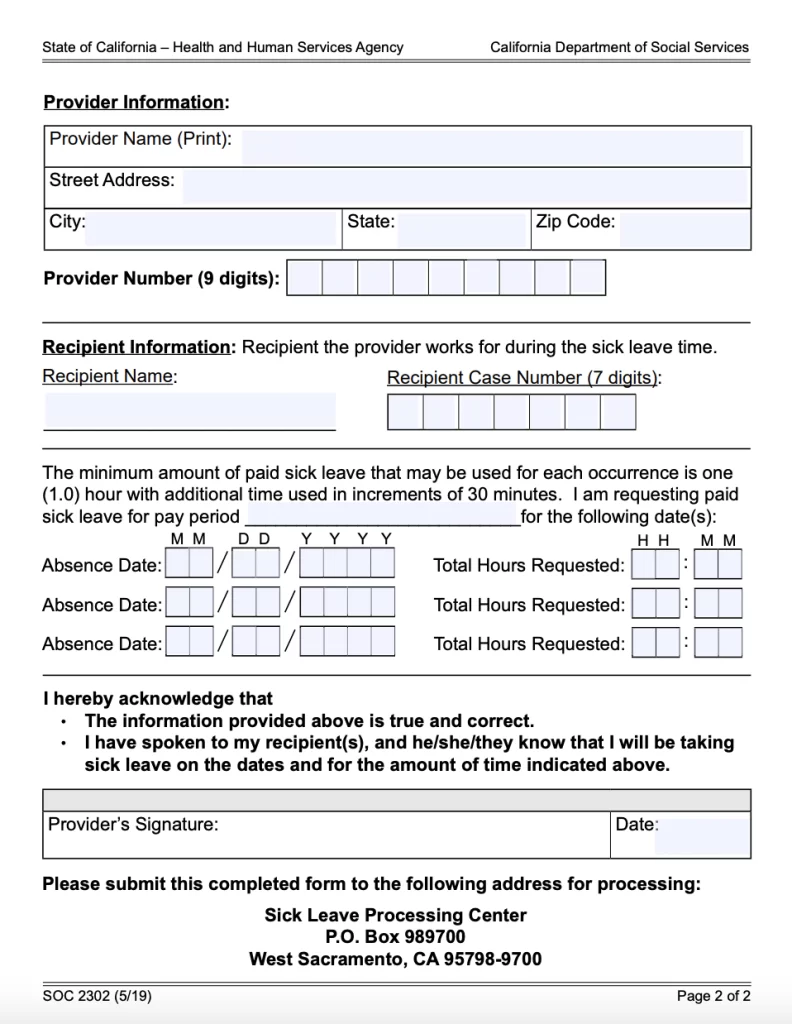
To officially request sick leave, you need to complete Form SOC 2302 (IHSS Sick Leave Request Form).
How to Fill It Out Without Mistakes
- Write your name and provider number exactly as it appears on your IHSS pay stub.
- List the date(s) you are requesting sick leave for.
- Sign and date the form before submitting.
🚨 Common Mistake Alert: Many providers forget to sign the form, which delays processing. Always double-check!
🚨 Important: Keep a copy for your records!
Submit Your Sick Leave Request
Once your form is complete, you need to send it in.
- Mail It to your county IHSS office.
- Fax It (if your county allows it—call to confirm).
- Electronically through the IHSS Portal
⏳ Processing Time: IHSS typically takes 2-3 weeks to process sick leave payments. You’ll receive a separate payment for sick leave, which won’t affect your regular paycheck.
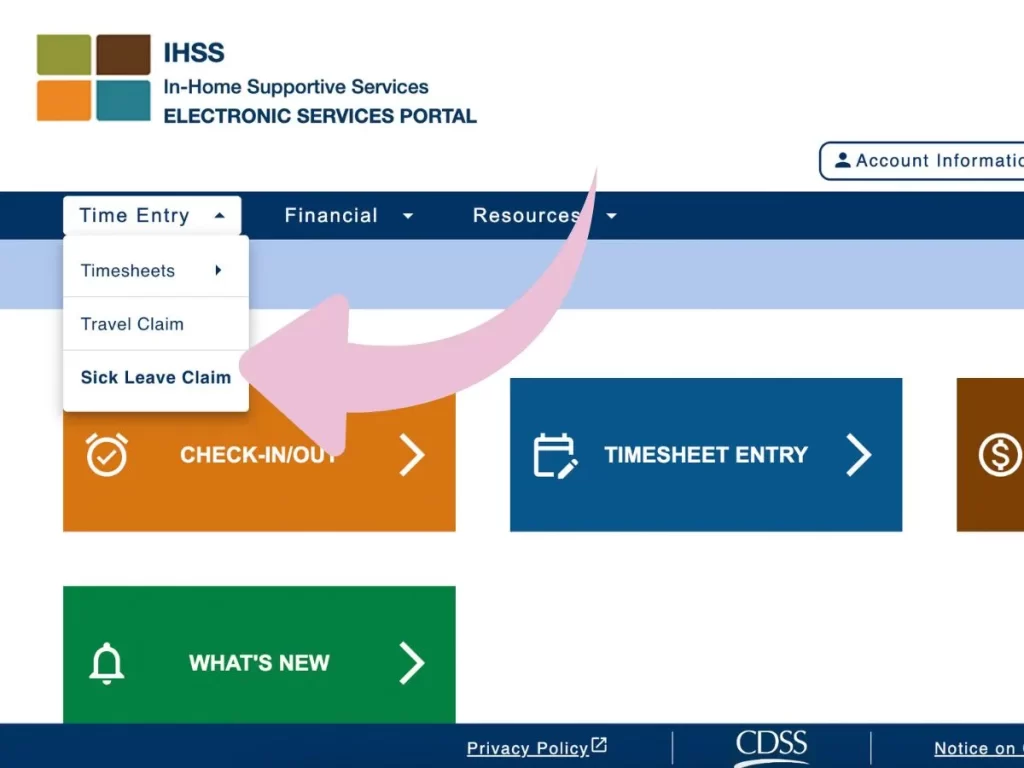
2. Electronically – Using the IHSS Portal
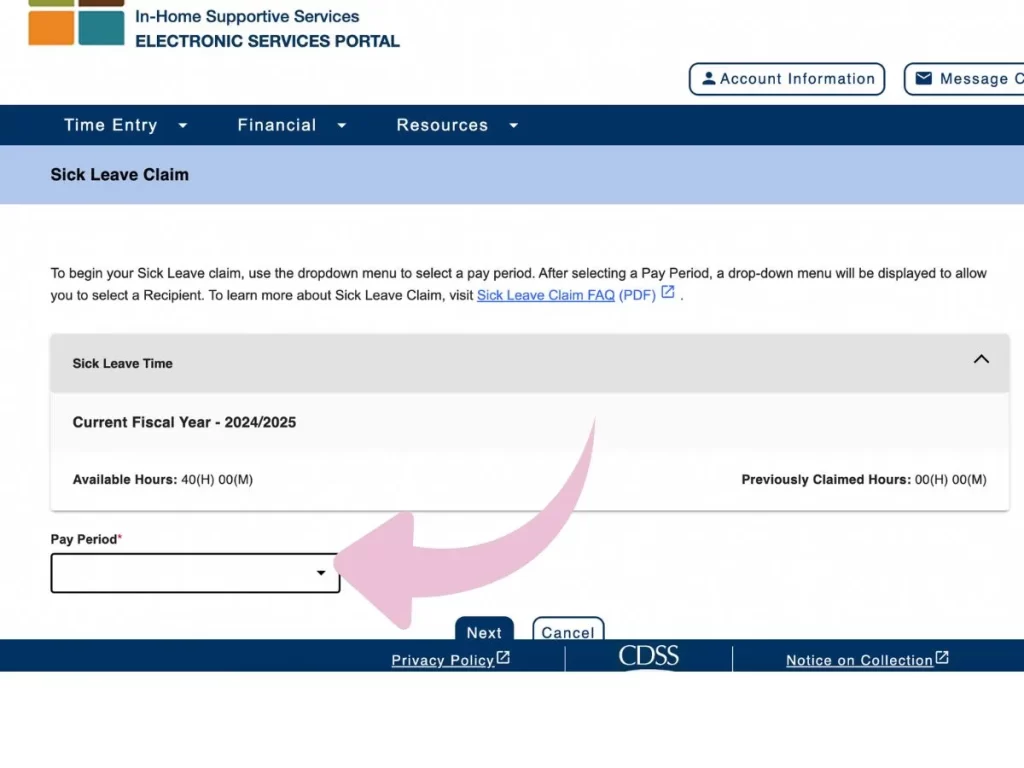
Log Into the IHSS Electronic Services Portal (ESP)
- Go to IHSS Electronic Services Portal.
- Click on Time Entry and choose Sick Leave Claim (Here you see the hours you have available)
- Click on Pay Period
- Click and choose the Recipient
- Fill out the Form (Date & Amount of hours)
- Click Submit Claim
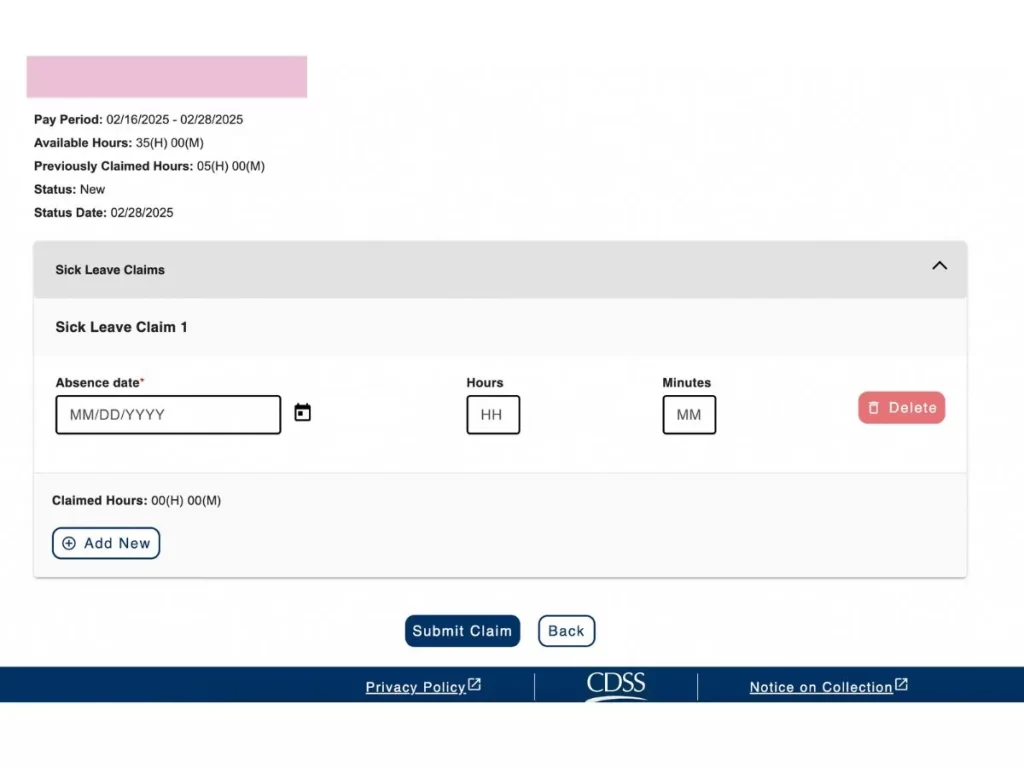
Enter the date and time of your absence.
Select the Add New button to add an additional Absence Date.
Select the Submit Claim button to finalize this claim.
- You must complete the existing Absence Date before adding a new Absence Date.
- Each Absence Date must have a minimum of 1 hour claimed with additional time claimed in 30 minute increments.
- If you only have 30 minutes available, then you can claim less than 1 hour.
- You must include all claimed hours for an Absence Date in a single row.
- You cannot claim more than your Available Hours.
- You can delete additional Absence Dates by selecting the Delete button.
Electronically Sign and Submit the Request
- Click “Review & Submit” to double-check all details.
- Read the certification statement and electronically sign your request.
- Click “Submit” to finalize the request.
📌 Once submitted, you should receive a confirmation message. Keep a screenshot or note the confirmation number for your records.
Track Your Payment Status
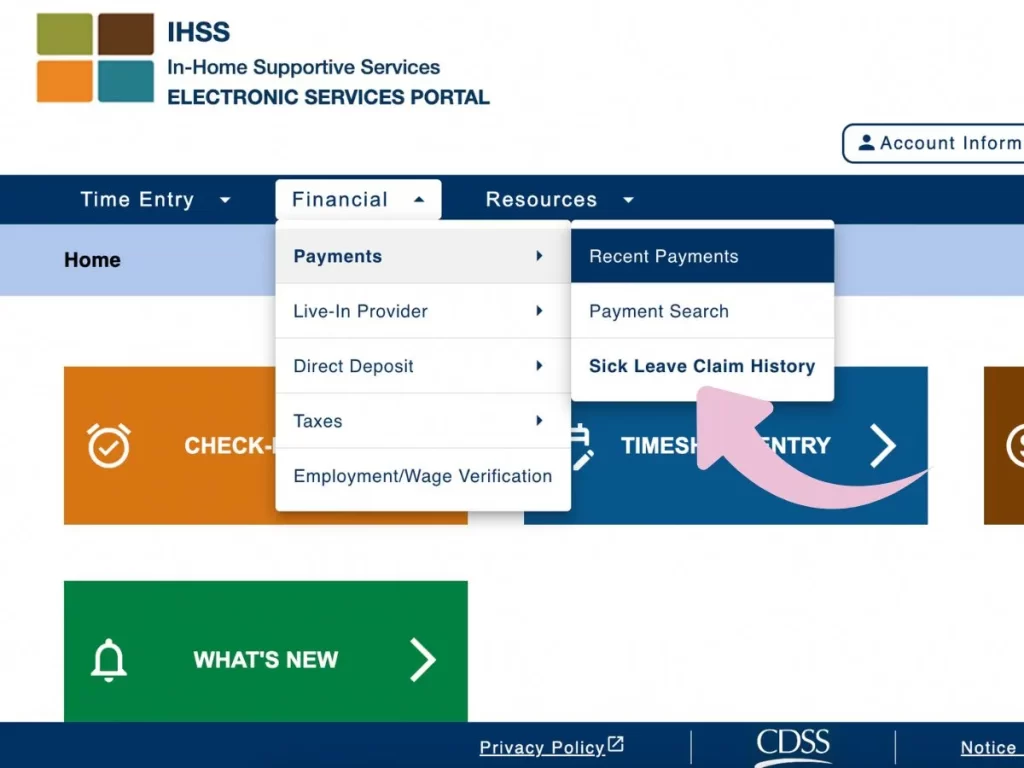
After submitting your request, follow these steps to track your payment:
- Go back to the ESP homepage.
- Click on “Payment History” in the menu.
- Look for a separate sick leave payment (IHSS pays this separately from your regular paycheck).
- If payment is delayed beyond 3 weeks, contact your county IHSS office for an update.
🚨 IHSS issues sick leave payments separately, so check your payment status in the portal
FAQ’s About IHSS Paid Sick Leave

1. Does My Recipient Have To Sign My Leave Sick Claim Form?
No, your recipient doesn’t need to sign your sick leave claim form.
2. Can I Take Multiple Sick Days In A Row?
Yes, as long as you have enough accrued sick leave hours. Just make sure you submit a request for each day.
3. Will Sick Leave Affect My Regular IHSS Hours Or Pay?
No, using sick leave does not reduce your normal IHSS hours. It is paid separately and at your regular hourly rate.
So don’t worry about your weekly max hours or your monthly hours.
Fill hour timesheets as you usually do.
Example:
- In the Timesheet you put 8 hours worked on January 22nd
- In the Sick Leave Claim you put 2 hours on January 22nd
- Obviously you cannot claim more than 24 hours in a day…. 🙂 So don’t put 24 hours on your timesheet and try to claim an hour of sick leave for that same day.
4. How Much Sick Leave Can I Claim Per Incident?
“When claiming sick leave, you must use a minimum of 1 hour per claim. If you need to use more than 1 hour in a single claim, you can claim time in increments of 30 minutes after the 1st hour.
You can use your entire sick leave balance at once if needed. If your remaining balance becomes 30 minutes, you can claim less than the minimum of 1 hours in that instance.” (IHSS – FAQ)
5. Does My Sick Leave Balance Carry-Over To The Next Year? Am I Paid For Unused Sick Leave?
No. Any unused sick leave does not carry-over to the next fiscal year. You are not paid for sick leave time that is not used by the end of the fiscal year.
6. Will My Paid Sick Leave Be Paid To Me In The Same Warrant As My Regular Payment?
“Paid sick leave will be mailed to providers in a separate warrant from their regular payment. The sick leave payment will not be included on a warrant for regular hours that may be processed on the same day.
Sick leave payments are considered income for the purposes of Federal and State income taxes. However, if a Live-In Self-Certification Form (SOC 2298) has been processed for the provider, the income will be excluded from income taxation.”
If You Need Additional Help

If you feel overwhelmed reach out for help!
The IHSS Service Help Desk at (866) 376-7066 is available to answer questions about sick leave earnings, usage, and balance.
Please contact the IHSS Service Desk at (866) 376-7066 during normal business hours of 8 a.m. – 5 p.m. Monday through Friday, excluding major holidays.
To Summarize
Taking paid sick leave as an IHSS provider is your right, and the process is easier than you might think.
By submitting your request correctly, you can ensure you get paid while taking the rest you need. Just remember to double-check your hours, sign your request, and track your payment status to avoid common mistakes.
In case of any doubt, contact your local IHSS office.
As always I hope you found this post useful and share if you know of anyone who could use this information.
Autism moms helping other moms!
Other Posts You Will Love
- 7 Failproof Ways to Complete Your IHSS Timesheet
- What You Need To Know To Receive Maximum Hours For IHSS
- IHSS Autism. Everything You Need to Get Approved
- Best Free Services In Regional Center For Autism
- IHSS Renewal: What to Expect and How to Prepare
About The Author
Written by Belén, a former therapist, late-diagnosed neurodivergent woman, and stay-at-home mom to her autistic son. She creates thoughtful, practical content to support caregivers and families navigating hospital stays, disability, and neurodivergent life.
A complete guide on how to claim IHSS sick leave, including eligibility, rules, and tips every caregiver needs to know.